
Turn your AI
into a learning engine.
Wovely connects with the Claude or ChatGPT you already use. Your AI becomes able to plan your learning, organize key points, and quiz you later — turning everyday conversations into an effective learning environment.
Free to start. Connecting your AI takes three steps.
Learn more about supported AI assistants
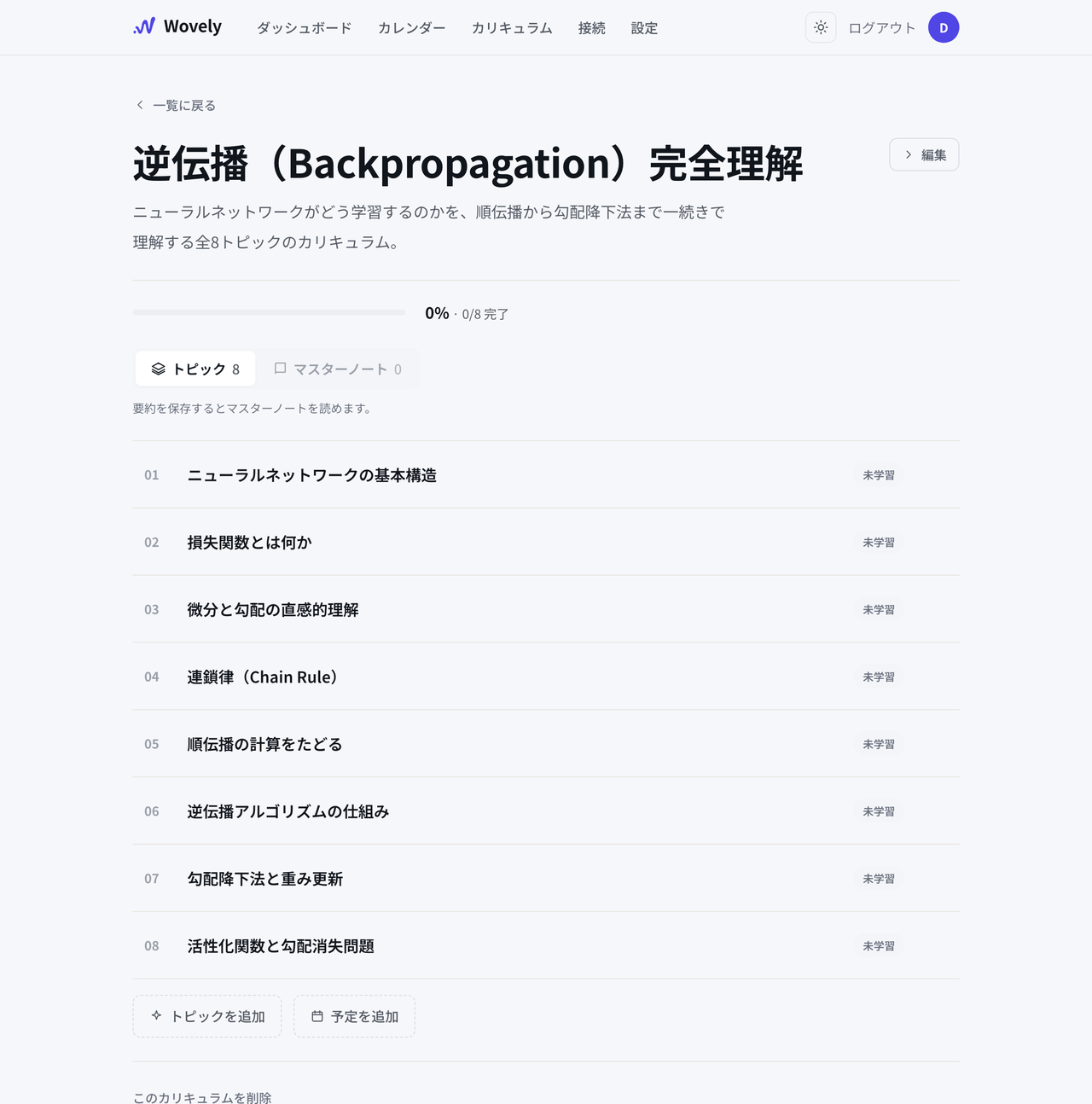
Build me a curriculum on backpropagation.
WovelySaved curriculum
Done — 8 topics in total.
Build me a curriculum on backpropagation.
WovelySaved curriculum
Done — 8 topics in total.
Summarize the key points so far.
WovelySaved note
Saved. You can revisit it anytime.
Try explaining what you've learned — out loud.
WovelySaved recall log
You've got a solid grasp of this.
Wovely adds powerful learning features to your AI
Problem
You learned it with AI. You understood it. And still, it slipped away.
You looked it up once. You understood it at the time. Yet somehow it never quite stuck — sound familiar?
From now on, make it stick with Wovely.
Capabilities
Connect once, and your AI gains four new abilities.
Just talk to your AI. Wovely supports every step, from planning to lasting retention.
01 Plan
Build an effective curriculum
Say “make this a curriculum” — and the plan is saved.
Talk through what you want to learn and have your AI draft the curriculum. The plan is saved to Wovely, so your AI always knows where you are and what comes next.
- The conversation becomes the plan — no work in another app
- Your AI tracks your progress — sharper suggestions for what to learn next
I want to learn backpropagation. Create the best curriculum for me.
WovelySaved curriculum
Saved to Wovely. Curriculum: “Backpropagation, Completely Understood” — 8 topics.
- How neural networks are structured
- What a loss function is
- Derivatives and gradients, intuitively
- The chain rule
…
Shall we start with topic 1?
Your curriculum lives in Wovely — pick up right where you left off.
02 Capture
One ask turns understanding into a note.
No rewriting later. Just say “save this.”
When something clicks in conversation, just say “save the key points.” Your AI writes them into a master note — and topic by topic, a textbook of your own builds itself.
- Capture in one ask — key points saved straight from the conversation
- Organized automatically — filed under the right topic in your curriculum
Save what we've covered so far to my master note.
WovelySaved master note
Saved topic 01, “How neural networks are structured,” to your master note. Key points:
- The roles of weights, biases, and activation functions
- Stacked layers and the forward pass
- “Learning means updating the weights”
Notes are organized by topic — ready for rereading, and for checking your next recall session.
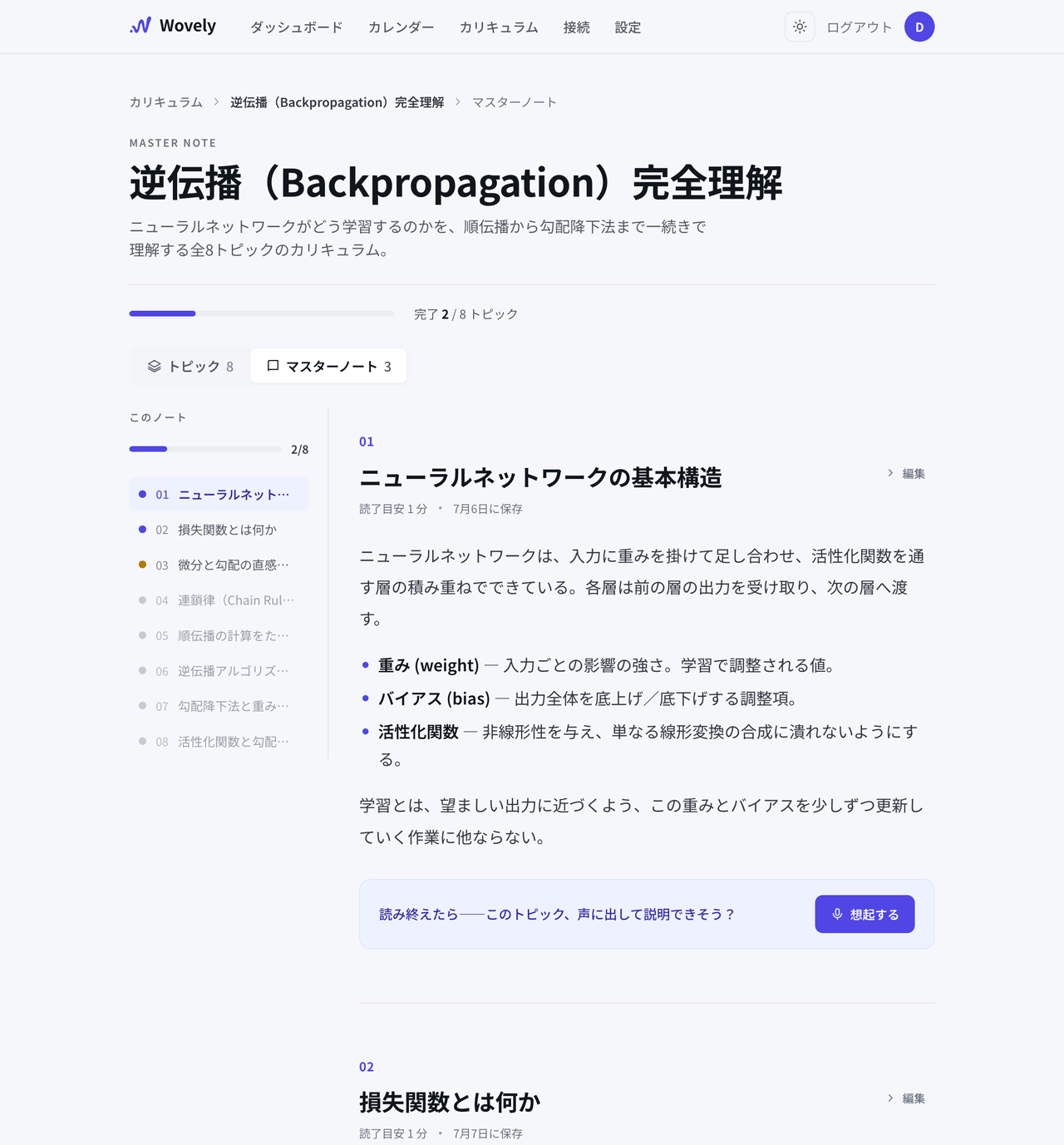
Saved notes are always there to reread in Wovely.
03 Recall
Your AI asks the questions. And checks your answers.
Recalling without looking beats rereading.
Say “quiz me” and your AI builds questions from your notes. Explain in your own words — without peeking — and get instant feedback on what's solid and what's still fuzzy. Every act of recall makes the memory stronger.
- Questions from your master notes — only what you actually studied
- Feedback on the spot — fuzzy areas surface right away
04 Voice recall
Explain what you learned, out loud.
The strongest form of output turns understanding into knowledge.
Say it out loud. Speaking what you've learned makes it stick far better — on a walk, between chores, whenever a keyboard isn't an option.
- No typing, just talking — explaining is the best recall there is
- Your AI analyzes it too — feedback comes back on what you actually said
Record anytime. Explain what you've learned, in your own words.
What you learned, in your own words
Recording — press stop when you're done.
Easy setup
Connecting your AI, fully guided.
You connect once, at the start. Buttons open the right settings screens, and every value you need is one click to copy.
- Open the connector screen — a button takes you straight there, no hunting
- Paste the connection URL — one-click copy, nothing to type
- Click “Allow” — and you're done
- No installs, no API keys, no code
- Claude connects even on the free plan (ChatGPT requires Plus or higher)
- Wovely never reads your conversations on its own. It saves only when you ask.
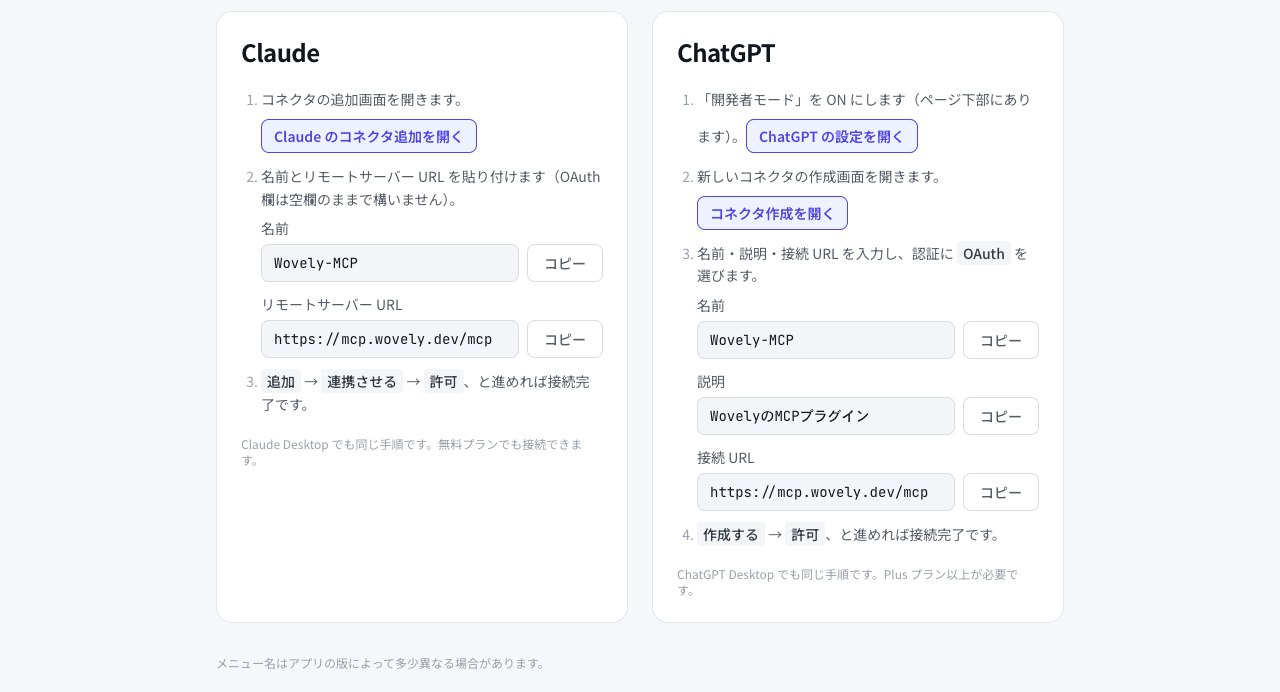
This is the actual guide screen you'll see after signing up (currently in Japanese). Every confusing step is a button.
Why Wovely
No more copy-pasting. No more card-making.
Wovely works hand in hand with your AI. The tedious parts — summarizing later, building flashcards — go to your AI, so you can focus on output.
Learn with your usual AI
Claude / ChatGPT
Saved in Wovely, made to stick
Plans · Notes · Recall
Wovely runs on the AI you already have. There are no AI usage fees inside Wovely — and nothing extra is ever billed.
Learn more about supported AI assistants
Pricing
Start free.
Go Pro when you're serious about retention.
Free to start, right now — no credit card.
Upgrade to Pro anytime from Settings after you sign up.
Your learning companion stays the Claude / ChatGPT you already use. Wovely includes no AI usage fees — you'll never be charged beyond the prices above.
From the developer
Wovely began with my own problem. Learning with AI is astonishingly fast — every day you feel like you've understood something new. Yet a week later, I could barely remember what I had learned. I could look it up and understand it again — but that isn't the same as knowing it.
Keep learning where you already learn — with your AI — and turn that understanding into knowledge you keep. That's why I built Wovely.
AI has dramatically shortened the time it takes to understand something. What we need next, I believe, is an environment for making that understanding truly ours.
Follow the build on XFAQ
Make what you learn truly yours.
Signup takes moments, and you can start right away. No AI usage fees, nothing extra billed (see the FAQ for supported AIs).